



How To Change the Battery in a GMC Key Fob
You’ve noticed it, haven’t you? That quick, reliable response you’ve grown accustomed to when you lock or unlock your GMC’s doors remotely is now more of a hit-or-miss. The good news is, it’s probably not your key fob failing. It could just be that the battery needs replacing. Whether you’re cruising in a sleek Acadia, navigating city streets in a Terrain, or towing heavy loads with a Sierra, an unresponsive key fob can be quite frustrating.
Fortunately, there’s an easy fix that doesn’t involve a trip to the dealership or a call to your mechanic. Changing the battery in your GMC key fob is a simple task you can do at home in just a few minutes. No fancy tools are necessary — just a bit of your time — and you’ll soon have your GMC responding to your touch as swiftly as the day you first got it.
Frequently Asked Questions
Before diving into the step-by-step guide, let’s answer some of the most common questions we receive about GMC key fobs and their batteries.
How Do I Know for Sure If My Key Fob Battery Needs Replacing?
One clear sign that your GMC key fob battery needs replacing is inconsistent performance. If you notice that the range at which your key fob successfully locks or unlocks your vehicle is smaller or the response time is getting slower, it’s likely time for a new battery.
Other indicators include the need to press buttons repeatedly for a response or the key fob not working at all, even at close range. Some GMC models feature a warning light on the dashboard that illuminates when the key fob battery is low, serving as a direct indicator that it’s time to replace the battery.
How Long Do GMC Key Fob Batteries Typically Last?
Most GMC vehicle key fobs use 3-volt CR2032 lithium coin batteries, renowned for their longevity and reliability. On average, these batteries can last for about three to four years under normal usage. However, this may vary slightly based on how frequently you use your key fob and the specific model of your GMC.
Will I Need to Reprogram My Key Fob After Replacing the Battery?
In most cases, you won’t need to reprogram your GMC key fob after changing the battery. However, if you encounter any issues, consult your GMC owners manual or contact your dealership for assistance.
Can I Use a Different Type of Battery Than the One Recommended for My GMC Key Fob?
It’s not recommended to use a different type of battery for your GMC key fob, as it may affect its performance and could potentially damage the fob. Stick to the recommended 3-volt CR2032 coin battery for best results.
What GMC Models Use Key Fobs?
Most modern GMC vehicles, including the Terrain, Acadia, Yukon, Sierra, and Canyon, come equipped with key fobs for keyless entry and ignition. This convenient feature allows you to lock and unlock the doors, open the trunk, and even start the engine remotely on models with remote start capability.
Step-by-Step Guide to Changing the Battery in Your GMC Key Fob
Now that we’ve answered some of your questions, let’s dive into the process of changing the battery in your GMC key fob. Follow these simple steps, and you’ll have a fully functioning key fob in no time.
Find the Right Battery
Consult your GMC owners manual or look up your model year online to determine the correct replacement battery type for your key fob. The most common is the CR2032, but some GMC models may use CR2025 or CR2016. Purchase name-brand batteries from reputable retailers for the best quality and longevity.
Gather Your Supplies
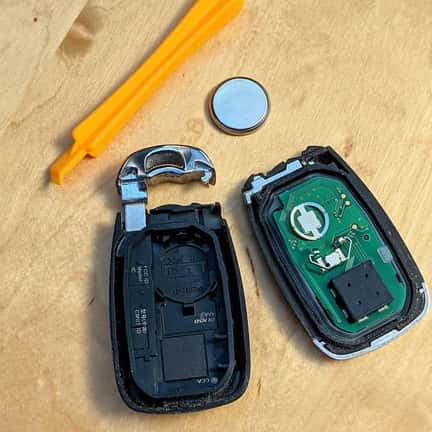
Once you’ve identified the correct battery type for your GMC key fob, gather the tools you’ll need for the task. You’ll need a small flat-head screwdriver or a non-marring plastic pry tool to gently open the key fob case without causing any damage.
Separate the Key Fob Housing
Locate the seam on your GMC key fob case, which is usually on the back or side. Gently insert the flat tool into the joint and twist slowly to separate the two halves of the case. Pry gently to avoid cracking the plastic case or damaging the internal components. Once open, you’ll see the battery compartment on one side and the circuit board with buttons on the other.
Remove the Old Battery
Carefully lift the old battery out of its compartment. If the battery seems stuck, use a non-metallic tool, such as the plastic pry tool or a toothpick, to gently pull it out. Avoid using excessive force and ensure that the tool doesn’t touch the circuit board or any other internal components to prevent accidental damage.
Install the New Battery
Take the new CR2032 (or specified) battery and position it in the battery tray with the positive (+) side facing up, following any polarity markers. The battery should sit flat without forcing and should be snug in the compartment.
Close the Key Fob Case
Carefully line up the two halves of the key fob case and gently press them back together. You may hear a click when it locks back into place properly. Ensure that the edges align and that there are no gaps between the two halves to keep out moisture and debris. Give the key fob a gentle shake to make sure everything is secure. If the case doesn’t close easily, don’t force it; instead, double-check that the battery is seated correctly and that no internal components are misaligned.
Test Your Key Fob
To test the new battery, press any button on the key fob to make sure it works. If you have remote start capability, try starting your vehicle remotely to ensure the feature is still functioning correctly. If everything works as it should, congratulations. You’ve successfully replaced the battery in your GMC key fob.
Schedule a Service Appointment at Cochran Buick GMC Youngstown
If you still need help with your GMC key fob or would prefer to have a professional handle the battery replacement, our dealership’s service department is always happy to help. Our trained technicians are knowledgeable about all things GMC and will ensure your key fob works as it should. Contact us today to schedule a service appointment, or stop by our dealership for a quick battery replacement service.
2021-09-26_02-15-14 by Steve Rainwater is licensed with CC BY-SA 2.0 DEED
0 comment(s) so far on How To Change the Battery in a GMC Key Fob