



How To Change the Battery in a Buick Key Fob
Buick designs its car key fobs with your convenience in mind. The ability to lock or unlock your car, open your trunk, and even start your car remotely, all with the touch of a button, is a testament to this. However, when these features begin to fail, it can be frustrating. That’s why we’re here to help.
Our Cochran Buick GMC Youngstown team is here to guide you through the steps to changing your key fob battery. Fortunately, a Buick key fob battery replacement is an easy do-it-yourself project. Whether you have an Envista SUV or a Buick sedan, the instructions are universal. We even have some helpful tips on how to preserve your key fob’s battery life.
Signs That Your Buick Key Fob Battery Needs Replacement
A telltale sign that your Buick key fob’s battery needs replacing is a lack of response from your vehicle when you press a key fob button. As the battery nears the end of its life, the transmitter’s range weakens until it loses range altogether. Here are some other signs your key fob needs a battery replacement:
- You need to be much closer to your car than usual for your Buick to accept the signal.
- The Buick key fob becomes inconsistent, unreliable, or no longer gives out a signal.
- You have to press the key fob buttons repeatedly until your Buick picks up the signal.
Tools and Materials You’ll Need
Depending on your Buick’s key fob, you may not need tools to open the battery compartment. Still, you only need one tool and a replacement battery to get the job done. Visit your local automotive store or Buick dealership in Youngstown for expert assistance. Here’s what you need:
- A small flathead screwdriver.
- A CR2032 battery.
Step-By-Step Guide To Changing the Battery in Your Buick Key Fob
Once you have the tools you need for your Buick key fob battery replacement, determine whether your key fob has a metal key, as the instructions differ. This is a simple process you can easily perform. Here are the steps you need to take to open your key fob, depending on the type:
How To Open a Buick Key Fob With a Metal Key
- Press the button on your Buick key fob that pops out the mechanical key. Depending on the key fob type, this button will be a chrome rectangle located on the back or a round chrome button on the front.
- If the mechanical key is removable, pull the metal key out completely while pressing down on the chrome button. Use the metal key to pry open the key fob case to access the battery. Skip this step if the key is not removable.
- If the metal key is not removable, use a small flathead screwdriver to open the key fob case.
How To Open a Buick Key Fob Without a Metal Key
- If your Buick key fob does not have a mechanical key, use a small flathead screwdriver to pry open the case.
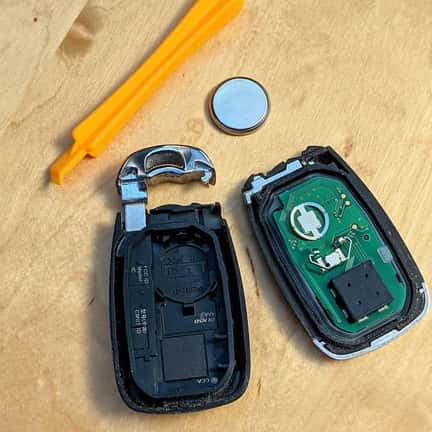
- Separate the sides of the case to locate the Buick key fob battery.
How To Replace Your Buick Key Fob Battery
- Note which way the positive side (+) on the old battery is facing before removing it, so you know which way the new battery should face.
- Use a small flathead screwdriver to pop out the Buick key fob battery and remove it. If the battery is located inside the key fob’s back cover, remove it with your fingers.
- Insert the new CR2032 battery with the positive side (+) oriented in the same position as the old battery.
- Replace the Buick key fob’s cover and press it down until you hear it click back into place.
Helpful Tips for Extending the Life of Your Key Fob Battery
Your Buick key fob battery’s lifespan depends on the type, lasting two to three years if it’s a smart key and four to six years with a mechanical key. Regardless of the key fob type, there are several ways you can extend its life, as follows:
Use a High-Quality Key Fob Replacement Battery
Using the highest quality materials is important to maintaining new Buick SUVs, even key fob replacement batteries. If you use a cheap or low-quality battery, it could die quickly. Purchase high-quality batteries from a reputable brand to ensure reliability and long battery life.
Monitor Your Buick Key Fob Frequency of Use
How often you use your Buick key fob can affect the battery’s lifespan, meaning the more you use it, the faster the battery drains. Consider purchasing a spare key fob and alternating between the two to reduce the frequency of use.
Be Mindful of Where You Store Your Buick Key Fob
Environmental factors like extreme temperatures, humidity, and exposure to water or moisture can affect your Buick key fob battery’s lifespan, causing it to die quickly. Always store your key fob indoors in a cool, dry place to protect it. Alternatively, consider purchasing a protective case for your key fob. This will ensure its protection wherever you travel.
Keep Your Buick Key Fob Away From Electronic Devices
Electrical interference is another factor that can drain your Buick key fob’s battery. Keep your car key fob away from electronic devices such as mobile phones to reduce potential battery drain.
Troubleshooting
Troubleshooting a Buick key fob battery replacement is fairly quick and easy. Once you replace your Buick key fob battery, simply press and hold the unlock and lock buttons until your vehicle beeps twice, indicating a successful reprogramming. You can also press the remote start button if your Buick key fob has one.
Get Expert Help on All Your Buick Needs
Replacing your Buick key fob battery is an easy DIY project that’s low-cost and low-maintenance. If you’re struggling to figure out how to change the battery in your Buick key fob, our automotive service technicians are available to help. Contact our service department for all your Buick needs. With our expertise and access to quality Buick parts, we’ve got you covered. Ask about our parts specials to get a great deal on Buick key fob accessories and more.
0 comment(s) so far on How To Change the Battery in a Buick Key Fob